Wednesday, 8 October 2008

Dynamic Data Custom Pages: Dynamic/Templated FromView

These articles are now under the title of Custom PageTemplates:

  1. Custom PageTemplates Part 1 - Custom PageTemplates with Ajax Control Toolkit Tabs
  2. Custom PageTemplates Part 2 - A variation of Part 1 with the Details and SubGrid in Tabs
  3. Custom PageTemplates Part 3 - Dynamic/Templated Grid with Insert (Using ListView)
  4. Custom PageTemplates Part 4 - Dynamic/Templated FromView

Continuing on from Part 3 the same techniques will be applied to the FormView, making the FormView Dynamic and also having the facility to dynamically load user defined Templates at runtime.
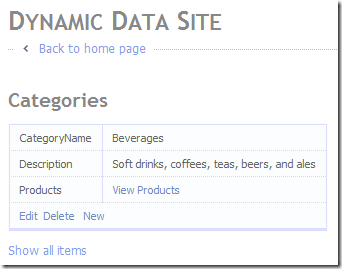
FormViewPage in action

Fugure 1 – FormViewPage in action

Note the Edit, Delete and New links these all act on this page and do not redirect to other pages.

Altering the Routing

Replace the default route Listing 1

routes.Add(new DynamicDataRoute("{table}/{action}.aspx")
{
    Constraints = new RouteValueDictionary(new { action = "List|Edit|Details|Insert" }),
    Model = model
});

Listing 1 – original routing in Global.asax

With the new routes in Listing 2

routes.Add(new DynamicDataRoute("{table}/{action}.aspx")
{
    Constraints = new RouteValueDictionary(new { action = "List" }),
    Model = model
});

routes.Add(new DynamicDataRoute("{table}/{action}/FormViewPage.aspx")
{
    Constraints = new RouteValueDictionary(new { action = "Edit|Details|Insert" }),
    ViewName = "FormViewPage",
    Model = model,
});

Listing 2 – changes to routing in global.asax

Note that the action {table}/{action}/FormViewPage.aspx as a prefix to the page name, this will be used to identify the pages mode (Edit, Delete and Insert)

The FromViewPage

<%@ Page 
    Language="C#" 
    MasterPageFile="~/Site.master" 
    CodeFile="FormViewPage.aspx.cs" 
    Inherits="FormViewPage" %>

<asp:Content 
    ID="Content1" 
    ContentPlaceHolderID="ContentPlaceHolder1" 
    Runat="Server">
    
    <asp:DynamicDataManager 
        ID="DynamicDataManager1" 
        runat="server" 
        AutoLoadForeignKeys="true" />

    <h2><%= table.DisplayName %></h2>

    <asp:ScriptManagerProxy 
        runat="server" 
        ID="ScriptManagerProxy1" />

    <asp:UpdatePanel 
        ID="UpdatePanel1" 
        runat="server">
        <ContentTemplate>

            <asp:ValidationSummary 
                ID="ValidationSummary_Edit" 
                EnableClientScript="true"
                HeaderText="List of validation errors" 
                ValidationGroup="FormView_Edit" 
                runat="server" />
                
            <asp:ValidationSummary 
                ID="ValidationSummary_Insert" 
                EnableClientScript="true"
                HeaderText="List of validation errors" 
                ValidationGroup="FormView_Insert" 
                runat="server" />
                
            <asp:DynamicValidator 
                ID="Validator_Edit" 
                Display="None" 
                ValidationGroup="FormView_Edit"
                ControlToValidate="FormView1" 
                runat="server" />
                
            <asp:DynamicValidator 
                ID="Validator_Insert" 
                Display="None" 
                ValidationGroup="FormView_Insert"
                ControlToValidate="FormView1" 
                runat="server" />
                
            <asp:FormView 
                ID="FormView1" 
                DataSourceID="FormViewDataSource" 
                OnItemDeleted="FormView_ItemDeleted"
                runat="server" onitemcommand="FormView1_ItemCommand" 
                oniteminserted="FormView1_ItemInserted">
            </asp:FormView>
            
            <asp:LinqDataSource 
                ID="FormViewDataSource" 
                AutoGenerateWhereClause="true" 
                EnableDelete="true" 
                EnableUpdate="true" 
                EnableInsert="true"
                runat="server">
                <WhereParameters>
                    <asp:DynamicQueryStringParameter />
                </WhereParameters>
            </asp:LinqDataSource>
            
            <br />
            
            <div class="bottomhyperlink">
                <asp:HyperLink 
                    ID="ListHyperLink" 
                    runat="server">Show all items</asp:HyperLink>
            </div>        
        
        </ContentTemplate>
    </asp:UpdatePanel>
</asp:Content>

Listing 3 – FormViewPage.aspx

using System;
using System.IO;
using System.Web.DynamicData;
using System.Web.UI.WebControls;

public partial class FormViewPage : System.Web.UI.Page
{
    protected MetaTable table;

    protected void Page_Init(object sender, EventArgs e)
    {
        DynamicDataManager1.RegisterControl(FormView1);
        table = FormViewDataSource.GetTable();

        // supported templates
        // get tamplate path
        var formViewTemplatePath = table.Model.DynamicDataFolderVirtualPath + "Templates/FormViewPage/" + table.Name + "/";

        // load user templates if they exist
        if (File.Exists(Server.MapPath(formViewTemplatePath + "ItemTemplate.ascx")))
            FormView1.ItemTemplate = LoadTemplate(formViewTemplatePath + "ItemTemplate.ascx");
        else
            FormView1.ItemTemplate = new FromViewPageRowGenerator(table, FormViewTemplateType.ItemTemplate);

        // load user templates if they exist
        if (File.Exists(Server.MapPath(formViewTemplatePath + "EditItemTemplate.ascx")))
            FormView1.EditItemTemplate = LoadTemplate(formViewTemplatePath + "EditItemTemplate.ascx");
        else
            FormView1.EditItemTemplate = new FromViewPageRowGenerator(table, FormViewTemplateType.EditItemTemplate);

        // load user templates if they exist
        if (File.Exists(Server.MapPath(formViewTemplatePath + "InsertItemTemplate.ascx")))
            FormView1.InsertItemTemplate = LoadTemplate(formViewTemplatePath + "InsertItemTemplate.ascx");
        else
            FormView1.InsertItemTemplate = new FromViewPageRowGenerator(table, FormViewTemplateType.InsertItemTemplate);

        // load user templates if they exist
        if (File.Exists(Server.MapPath(formViewTemplatePath + "EmptyDataTemplate.ascx")))
            FormView1.EmptyDataTemplate = LoadTemplate(formViewTemplatePath + "EmptyDataTemplate.ascx");
        else
            FormView1.EmptyDataTemplate = new FromViewPageRowGenerator(table, FormViewTemplateType.EmptyDataTemplate);
        //FormView1.FooterTemplate = null;
        //FormView1.HeaderTemplate = null;
        //FormView1.PagerTemplate = null;
    }

    protected void Page_Load(object sender, EventArgs e)
    {
        table = FormViewDataSource.GetTable();
        Title = table.DisplayName;

        // I don't know if this is 
        // the best way to do this
        // get the FormViews mode from the url
        String path = Request.Path.Substring(0, Request.Path.LastIndexOf("/"));
        var qs = path.Substring(path.LastIndexOf("/") + 1, path.Length - (path.LastIndexOf("/") + 1));
        switch (qs)
        {
            case "Details":
                FormView1.DefaultMode = FormViewMode.ReadOnly;
                break;
            case "Edit":
                FormView1.DefaultMode = FormViewMode.Edit;
                break;
            case "Insert":
                FormView1.DefaultMode = FormViewMode.Insert;
                break;
            default:
                break;
        }
        ListHyperLink.NavigateUrl = table.ListActionPath;
    }

    protected void FormView_ItemDeleted(object sender, FormViewDeletedEventArgs e)
    {
        if (e.Exception == null || e.ExceptionHandled)
        {
            Response.Redirect(table.ListActionPath);
        }
    }

    protected void FormView1_ItemCommand(object sender, FormViewCommandEventArgs e)
    {
        if (e.CommandName == "Cancel")
        {
            // option 1 go back to list
            //Response.Redirect(table.ListActionPath);

            // option 2 return to Normal ReadOnly
            FormView1.DefaultMode = FormViewMode.ReadOnly;
        }
    }

    protected void FormView1_ItemInserted(object sender, FormViewInsertedEventArgs e)
    {
        // option 1 go back to list
        Response.Redirect(table.ListActionPath);

        // option 2 return to Normal ReadOnly
        // note sure how to get this working at the moment
        //Response.Redirect(table.GetActionPath("Details", ???));
    }
}

Listign 4 – FormViewPage.aspx.cs

From Listings 3 and 4 you can see that this is a basic page like Details.aspx but with a FormView. The real magic goes on in the Page_Init event handler where the Templates are either loaded or dynamically generated and also in the Page_Load event handler where the default mode is detected via the URL.

Note: I’m not sure this is the best or most elegant way of doing this, but this will do for now and we will have a look at this again at a later date.

The RowGenerator

This will generate a table based FormView similar to the Details.aspx generated by the wizard (which at the time of writing was still in preview) the dynamically generated layout can be overridden be defining UserControl custom Templates in the ~/DynamicData/Templates/FormViewPage/<TableName>/<templated>.

/// <summary>
/// Template type for the FromViewPageRowGenerator 
/// </summary>
public enum FormViewTemplateType
{
    ItemTemplate,
    EditItemTemplate,
    InsertItemTemplate,
    EmptyDataTemplate,
    HeaderTemplate,
    FooterTemplate,
    PagerTemplate,
}

/// <summary>
/// Renders templates for ListView
/// </summary>
public class FromViewPageRowGenerator : ITemplate
{
    #region Member Fields, Constructor, Enums & Properties
    private MetaTable _table;
private FormViewTemplateType _type;

    public FromViewPageRowGenerator(MetaTable table, FormViewTemplateType type) 
    {
        _table = table;
        _type = type;
    }
    #endregion

    public void InstantiateIn(Control container)
    {
        IParserAccessor accessor = container;
        // get all the all scaffold columns 
        // except Long String Columns
        // SubGridViewsAttribute and column order
        var columnDetails = from c in _table.Columns
                            where c.Scaffold // && !c.IsLongString
                            select new ListViewColumn()
                            {
                                Column = c,
                                SubGridMetaData = c.Attributes.OfType<SubGridViewsAttribute>().FirstOrDefault(),
                                Order = c.Attributes.OfType<SubGridViewsAttribute>().FirstOrDefault() != null
                                && c.Attributes.OfType<SubGridViewsAttribute>().FirstOrDefault().Order > 0
                                ? c.Attributes.OfType<SubGridViewsAttribute>().FirstOrDefault().Order
                                : int.MaxValue,
                            };

        // sort according to Order first and Column Name second
        // Note: if SubGridViewsAttribute is null or the attribute
        // has no value for Order then just sort but column display name
        columnDetails = from sg in columnDetails
                        orderby sg.Order, sg.Column.DisplayName
                        select sg;

        // call the appropriate template generator
        switch (_type)
        {
            case FormViewTemplateType.ItemTemplate:
                GetItemTemplate(accessor, columnDetails, DataBoundControlMode.ReadOnly);
                break;
            case FormViewTemplateType.EditItemTemplate:
                GetItemTemplate(accessor, columnDetails, DataBoundControlMode.Edit);
                break;
            case FormViewTemplateType.InsertItemTemplate:
                GetItemTemplate(accessor, columnDetails, DataBoundControlMode.Insert);
                break;
            case FormViewTemplateType.EmptyDataTemplate:
                GetEmptyDataTemplate(accessor, columnDetails);
                break;
            case FormViewTemplateType.HeaderTemplate:
                GetHeaderTemplate(accessor, columnDetails);
                break;
            case FormViewTemplateType.FooterTemplate:
                GetFooterTemplate(accessor, columnDetails);
                break;
            case FormViewTemplateType.PagerTemplate:
                GetPagerTemplate(accessor, columnDetails);
                break;
            default:
                break;
        }
    }

    private void GetItemTemplate(IParserAccessor accessor, IEnumerable<ListViewColumn> columnDetails, DataBoundControlMode templateMode)
    {
        // create new table
        var table = new HtmlTable();
        table.Attributes.Add("class", "detailstable");

        // add table to accessor
        accessor.AddParsedSubObject(table);

        // make sure there are some children columns
        if (columnDetails.Count() > 0)
        {
            // add a cell for each column in table
            foreach (ListViewColumn columnDetail in columnDetails)
            {
                // create new row for template
                var row = new HtmlTableRow();

                // add row to accessor
                table.Rows.Add(row);

                // create field name cell
                var fieldNameCell = new HtmlTableCell();
                // add cell to row
                row.Cells.Add(fieldNameCell);
                // set the title
                fieldNameCell.InnerText = columnDetail.Column.DisplayName;

                // create field cell
                var fieldCell = new HtmlTableCell();
                // add cell to row
                row.Cells.Add(fieldCell);

                // instantiate a DynamicControl for this Children Column
                var lvColumn = new DynamicControl(templateMode)
                {
                    ID = columnDetail.Column.Name,
                    ValidationGroup = "FormView_" + templateMode.ToString(),
                    // set data field to column name
                    DataField = columnDetail.Column.Name,
                };

                // add control to cell
                fieldCell.Controls.Add(lvColumn);
            }
            // create new row for template
            var commandRow = new HtmlTableRow();
            // add row to accessor
            table.Rows.Add(commandRow);

            // create the cell to hold the command buttons
            var commandCell = new HtmlTableCell();
            commandCell.Attributes.Add("class", "nowrap");
            commandCell.ColSpan = 2;
            commandRow.Cells.Add(commandCell);

            // create a spacer
            var spaceLit = new Literal();
            spaceLit.Text = @"&nbsp;";

            // create cancel link
            var cancelLink = new LinkButton()
            {
                //ID="EditLinkButton",
                Text = "Cancel",
                CausesValidation = false,
                CommandName = "Cancel",
            };

            switch (templateMode)
            {
                case DataBoundControlMode.Edit:
                    // ceate update link
                    var updateLink = new LinkButton()
                    {
                        //ID="UpdateLinkButton",
                        Text = "Update",
                        CausesValidation = true,
                        CommandName = "Update",
                    };

                    commandCell.Controls.Add(updateLink);
                    commandCell.Controls.Add(spaceLit);
                    commandCell.Controls.Add(cancelLink);
                    break;
                case DataBoundControlMode.Insert:
                    // create insert link
                    var insertLink = new LinkButton()
                    {
                        //ID="InsertLinkButton",
                        Text = "Insert",
                        CausesValidation = true,
                        CommandName = "Insert",
                    };
                    commandCell.Controls.Add(insertLink);
                    commandCell.Controls.Add(spaceLit);
                    commandCell.Controls.Add(cancelLink);
                    break;
                case DataBoundControlMode.ReadOnly:
                    // create edit link
                    var editLink = new LinkButton()
                        {
                            //ID="EditLinkButton",
                            Text = "Edit",
                            CausesValidation = false,
                            CommandName = "Edit",
                        };
                    // create delete link
                    var deleteLink = new LinkButton()
                        {
                            //ID="DeleteLinkButton",
                            Text = "Delete",
                            CommandName = "Delete",
                            CausesValidation = false,
                            OnClientClick = "return confirm(\"Are you sure you want to delete this item?\");",
                        };
                    // create new link
                    var newLink = new LinkButton()
                        {
                            //ID="insertLinkButton",
                            Text = "New",
                            CausesValidation = false,
                            CommandName = "New",
                        };

                    commandCell.Controls.Add(editLink);
                    commandCell.Controls.Add(spaceLit);
                    commandCell.Controls.Add(deleteLink);
                    commandCell.Controls.Add(spaceLit);
                    commandCell.Controls.Add(newLink);
                    break;
                default:
                    break;
            }

        }
        // if there are no children columns don't
        // bother to set the accessor to anything
    }

    private void GetEmptyDataTemplate(IParserAccessor accessor, IEnumerable<ListViewColumn> columnDetails)
    {
        // create a spacer
        var literal = new Literal();
        literal.Text = @"There are currently no items in this table.";

        // add row to accessor
        accessor.AddParsedSubObject(literal);
    }

    private void GetPagerTemplate(IParserAccessor accessor, IEnumerable<ListViewColumn> columnDetails)
    {
        throw new NotImplementedException();
    }

    private void GetFooterTemplate(IParserAccessor accessor, IEnumerable<ListViewColumn> columnDetails)
    {
        throw new NotImplementedException();
    }

    private void GetHeaderTemplate(IParserAccessor accessor, IEnumerable<ListViewColumn> columnDetails)
    {
        throw new NotImplementedException();
    }

    private class ListViewColumn
    {
        /// <summary>
        /// Column to display
        /// </summary>
        public MetaColumn Column { get; set; }

        /// <summary>
        /// MetaData if any from the original column
        /// </summary>
        public SubGridViewsAttribute SubGridMetaData { get; set; }

        /// <summary>
        /// Holds the sort order value
        /// </summary>
        public int Order { get; set; }
    }
}

Listing 5  - FromViewPageRowGenerator

The main difference between this implementation of ITemplate and the implementation in Part 3 is that the column title is in the same row as the DynamicControl so it produces a template similar to the output shown in Listing 6. The only difference between the different template types that are implemented are the links shown (Edit, Delete & New for ReadOnly), (Update & Cancel for Edit) and (Insert & Cancel for Insert) and the mode of the DynamicControls.

<table class="detailstable">
    <tr>
        <th>
            OrderDate
        </th>
        <td>
            <asp:DynamicControl 
                ID="DynamicControl1" 
                DataField="OrderDate" 
                Mode="ReadOnly" 
                runat="server" />
        </td>
    </tr>
    <tr>
        <th>
            RequiredDate
        </th>
        <td>
            <asp:DynamicControl 
                ID="DynamicControl2" 
                DataField="RequiredDate" 
                Mode="ReadOnly" 
                runat="server" />
        </td>
    </tr>
...// shortened for brevity

<
tr> <td colspan="2"> <asp:LinkButton ID="EditLinkButton" CausesValidation="false" CommandName="Edit" runat="server"> Edit </asp:LinkButton> <asp:LinkButton ID="DeleteLinkButton" CausesValidation="false" CommandName="Delete" OnClientClick='return confirm("Are you sure you want to delete this item?");' runat="server"> Delete </asp:LinkButton> <asp:LinkButton ID="InsertLinkButton" CausesValidation="false" CommandName="New" runat="server"> New </asp:LinkButton> </td> </tr> </table>

Listing 6 – Fragment of the output from FormViewTemplateType

Project Download

Again V3 contains all from the previous parts 1 - 3

Sunday, 5 October 2008

Dynamic Data Custom Pages: Dynamic/Templated Grid with Insert (Using ListView)

These articles are now under the title of Custom PageTemplates:

  1. Custom PageTemplates Part 1 - Custom PageTemplates with Ajax Control Toolkit Tabs
  2. Custom PageTemplates Part 2 - A variation of Part 1 with the Details and SubGrid in Tabs
  3. Custom PageTemplates Part 3 - Dynamic/Templated Grid with Insert (Using ListView)
  4. Custom PageTemplates Part 4 - Dynamic/Templated FromView

What are we trying to achieve here, let me start with an screen shot. Apparently a GridView with Insert, well actually its a ListView and not a big deal we can already do ListViews with Dynamic Data. Well this is a Dynamic ListView not a new control but a ListView with dynamically generated columns (templates actually). So what I wanted to achieve here was all the flexibility of the ListView with the dynamicness (I know not a real word) of the GridView under Dynamic Data.

Apparently a GridView with Insert

Figure 1 – Apparently a GridView with Insert

Steps to build this Custom PageTemplate

  1. Using a Custom Page generated by the Wizard as a basis for the Custom PageTemplate
  2. How to build a Column Generator Class for the ListView
  3. Adding the facility to Load Custom Templates at Runtime

Using a Custom Page generated by the Wizard as a basis for the Custom PageTemplate

I’m not going to do a step by step cut and paste of how to take a page generated by the Wizard and making it into a custom PageTemplate. What I am going to do is just show you the aspx page.

<%@ Page 
    Language="C#" 
    MasterPageFile="~/Site.master" 
    CodeFile="ListViewPage.aspx.cs" 
    Inherits="ListViewPage" %>

<%@ Register 
    Src="~/DynamicData/Content/ListViewPager.ascx" 
    TagName="ListViewPager"
    TagPrefix="asp" %>
    
<%@ Register 
    Src="~/DynamicData/Content/DynamicLinkControl.ascx" 
    TagName="DynamicLink"
    TagPrefix="asp" %>
    
<%@ Register 
    src="~/DynamicData/Content/FilterUserControl.ascx" 
    tagname="DynamicFilter" 
    tagprefix="asp" %>

<asp:Content 
    ID="Content1" 
    ContentPlaceHolderID="ContentPlaceHolder1" 
    Runat="Server">
    
    <asp:DynamicDataManager 
        ID="DynamicDataManager1" 
        runat="server" 
        AutoLoadForeignKeys="true" />

    <h2><%= table.DisplayName%></h2>

    <asp:ScriptManagerProxy 
        runat="server" 
        ID="ScriptManagerProxy1" />

    <asp:UpdatePanel 
        ID="UpdatePanel1" 
        runat="server">
        <ContentTemplate>
        
            <asp:ValidationSummary 
                ID="ValidationSummary_Edit" 
                EnableClientScript="true"
                HeaderText="List of validation errors" 
                ValidationGroup="ListView_Edit" 
                runat="server" />
                
            <asp:ValidationSummary 
                ID="ValidationSummary_Insert" 
                EnableClientScript="true"
                HeaderText="List of validation errors" 
                ValidationGroup="ListView_Insert" 
                runat="server" />
                
            <asp:DynamicValidator 
                ID="Validator_Edit" 
                Display="None" 
                ValidationGroup="ListView_Edit"
                ControlToValidate="ListView1" 
                runat="server" />
                
            <asp:DynamicValidator 
                ID="Validator_Insert" 
                Display="None" 
                ValidationGroup="ListView_Insert"
                ControlToValidate="ListView1" 
                runat="server" />

            <asp:FilterRepeater 
                ID="FilterRepeater" 
                runat="server">
                <ItemTemplate>
                    <asp:Label 
                        runat="server" 
                        Text='<%# Eval("DisplayName") %>' 
                        AssociatedControlID="DynamicFilter$DropDownList1" />
                    <asp:DynamicFilter 
                        runat="server" 
                        ID="DynamicFilter" 
                        OnSelectedIndexChanged="OnFilterSelectedIndexChanged" />
                </ItemTemplate>
                <FooterTemplate>
                    <br />
                    <br />
                </FooterTemplate>
            </asp:FilterRepeater>

            <asp:ListView 
                ID="ListView1" 
                DataSourceID="ListViewDataSource" 
                runat="server">
            </asp:ListView>
            
            <asp:LinqDataSource 
                ID="ListViewDataSource" 
                runat="server" 
                EnableDelete="true">
                <WhereParameters>
                    <asp:DynamicControlParameter ControlID="FilterRepeater" />
                </WhereParameters>
            </asp:LinqDataSource>

        </ContentTemplate>
    </asp:UpdatePanel>
</asp:Content>

Listing 1 – ListviewPage.aspx PageTemplate

As you can see (if you’ve ever created a custom page with the wizard) I’ve removed all the templates from the ListView and renamed all the ID’s appropriately (the existing naming would have worked but I like everything to be tidy).

The second thing to notice is that there are two ValidationSummarys and two DynamicValidators and from their naming you should be able to tell that one set is for editing and the other for inserting. This is to resolve the conflict Update and Insert buttons on validation (this is generated by the wizard).

Next I’ve removed all the table and context specific settings from the LinqDataSource and so the page is about ready.

How to build a Column Generator Class for the ListView

There is no ColumnGenerator or RowGenerators methods on the ListView class, this is because it is a templated control. After a little research I found the ITemplate interface (which I’d used in my earlier examples) here the MSDN article I used to develop this Creating Web Server Control Templates Programmatically.

The templates that the ListView will accepts are:

  • LayoutTemplate
  • ItemTemplate
  • EditItemTemplate
  • InsertItemTemplate
  • EmptyDataTemplate
  • AlternatingItemTemplate
  • EmptyItemTemplate
  • GroupSeparatorTemplate
  • GroupTemplate
  • ItemSeparatorTemplate
  • SelectedItemTemplate

So of the above Templates which do we need to implement to get a column generator working?

  • LayoutTemplate the layout
  • ItemTemplate each row
  • EditItemTemplate the edit row
  • InsertItemTemplate the insert row
  • EmptyDataTemplate only required if you set the InsertItemPosition to none

These are the Templates that are required to be implement the column generator.

Next creating the column generator using the ITemplate interface. The ITemplate interface requires only one method to be implemented:

public void InstantiateIn(Control container)

We could create a ITemplate interface class for each Template we need but what I decided to do was to create on class that would do all the Templates requires for the ListView, Listing 2 contain the InstantiateIn method.

public void InstantiateIn(Control container)
{
    IParserAccessor accessor = container;
    // get all the all scaffold columns 
    // except Long String Columns
    // SubGridViewsAttribute and column order
    var columnDetails = from c in _table.Columns
                        where c.Scaffold && !c.IsLongString
                        select new ListViewColumn()
                        {
                            Column = c,
                            SubGridMetaData = c.Attributes.OfType<SubGridViewsAttribute>().FirstOrDefault(),
                            Order = c.Attributes.OfType<SubGridViewsAttribute>().FirstOrDefault() != null
                            && c.Attributes.OfType<SubGridViewsAttribute>().FirstOrDefault().Order > 0
                            ? c.Attributes.OfType<SubGridViewsAttribute>().FirstOrDefault().Order
                            : int.MaxValue,
                        };

    // sort according to Order first and column name second
    // note if SubGridViewsAttribute is null or the attribute
    // has no value for Order then just sort but column display name
    columnDetails = from sg in columnDetails
                    orderby sg.Order, sg.Column.DisplayName
                    select sg;

    // call the appropriate template generator
    switch (_type)
    {
        case TemplateType.LayoutTemplate:
            GetLayoutTemplate(accessor, columnDetails);
            break;
        case TemplateType.ItemTemplate:
            GetItemTemplate(accessor, columnDetails, TemplateMode.Normal);
            break;
        case TemplateType.AlternatingItemTemplate:
            GetItemTemplate(accessor, columnDetails, TemplateMode.Alternate);
            break;
        case TemplateType.EditItemTemplate:
            GetItemTemplate(accessor, columnDetails, TemplateMode.Edit);
            break;
        case TemplateType.InsertItemTemplate:
            GetItemTemplate(accessor, columnDetails, TemplateMode.Insert);
            break;
        case TemplateType.SelectedItemTemplate:
            GetItemTemplate(accessor, columnDetails, TemplateMode.Selected);
            break;
        case TemplateType.GroupTemplate:
            GetGroupTemplate(accessor, columnDetails);
            break;
        case TemplateType.GroupSeparatorTemplate:
            GetGroupSeparatorTemplate(accessor, columnDetails);
            break;
        case TemplateType.ItemSeparatorTemplate:
            GetItemSeparatorTemplate(accessor, columnDetails);
            break;
        case TemplateType.EmptyDataTemplate:
            GetEmptyDataTemplate(accessor, columnDetails);
            break;
        case TemplateType.EmptyItemTemplate:
            GetEmptyItemTemplate(accessor, columnDetails);
            break;
        default:
            break;
    }
}

Listing 2 – InstantiateIn method

Yes I know I’ve implemented the InstantiateIn method to cover all the Template types, but I thought if the scaffolding is there for the other Templates then it would be a simple matted to implement them if needed at a later date.

So now the individual Template generators are left to be built.

private void GetLayoutTemplate(IParserAccessor accessor, IEnumerable<ListViewColumn> columnDetails)
{
    // make sure there are some children columns
    if (columnDetails.Count() > 0)
    {
        // HtmlTable/HtmlTableRow/HtmlTableCell 
        // create table
        var htmlTable = new HtmlTable();
        htmlTable.Attributes.Add("class", "listview");

        // add table to accessor
        accessor.AddParsedSubObject(htmlTable);

        // create header row
        var headerRow = new HtmlTableRow();

        // create empty header cell
        // NOTE: you could move the command cell to after the
        //       foreach column generator code if you wanted
        //       the command buttons to be at the end of the row
        var commandCell = new HtmlTableCell("th");
        headerRow.Cells.Add(commandCell);

        // add a column heading for each column
        foreach (ListViewColumn columnDetail in columnDetails)
        {
            //<asp:LinkButton 
            //    ID="OrderDateLinkButton" 
            //    CommandName="Sort" 
            //    CommandArgument="OrderDate"
            //runat="server"> OrderDate </asp:LinkButton>

            var cell = new HtmlTableCell("th");
            var linkButton = new LinkButton()
            {
                ID = columnDetail.Column.Name + "LinkButton",
                CommandName = "Sort",
                CommandArgument = columnDetail.Column.Name,
                Text = columnDetail.Column.DisplayName,
            };
            cell.Controls.Add(linkButton);
            headerRow.Cells.Add(cell);
        }
        htmlTable.Rows.Add(headerRow);

        //<tbody>
        //    <tr id="itemPlaceHolder" runat="server">
        //    </tr>
        //</tbody>
        // create the table body and item place holder
        var itemPlaceholder = new HtmlTableRow();
        itemPlaceholder.ID = "itemPlaceholder";
        itemPlaceholder.Attributes.Add("runat", "Server");
        htmlTable.Rows.Add(itemPlaceholder);

        //<tfoot>
        //    <tr class="footer">
        //        <td colspan="14">
        //            <asp:ListViewPager ID="ListViewDataPager" runat="server"></asp:ListViewPager>
        //        </td>
        //    </tr>
        //</tfoot>
        // create the footer
        var footerRow = new HtmlTableRow();
        footerRow.Attributes.Add("class", "footer");

        // set column span to number od columns
        // plus 1 to account for the command column
        var footerCell = new HtmlTableCell();

        // get column span
        int columnSpan = columnDetails.Count() + 1;
        footerCell.Attributes.Add("colspan", columnSpan.ToString());

        // get the path to the ListViewPager
        var listViewPagerPath = _table.Model.DynamicDataFolderVirtualPath + "Content/ListViewPager.ascx";
        // load ListViewPager control
        var listViewPager = _page.LoadControl(listViewPagerPath);
        listViewPager.ID = "ListViewDataPager";
        footerCell.Controls.Add(listViewPager);
        footerRow.Cells.Add(footerCell);
        htmlTable.Rows.Add(footerRow);

    }
    // if there are no children columns don't
    // bother to set the accessor to anything
}

Listing 3 - GetLayoutTemplate

In Listing 3 the GetLayoutTemplate generates a template the same as the declarative template in the wizard generated page:

  • Column headers with sort links
  • Item Place Holder
  • Footer with the ListViewPager (which needs copying from a wizard generated website)
Note: It’s worth pointing out that the command column is added to the header in the standard left position you could move it to the right by moving it to after the foreach loop.
private void GetItemTemplate(IParserAccessor accessor, IEnumerable<ListViewColumn> columnDetails, TemplateMode templateMode)
{
    // make sure there are some children columns
    if (columnDetails.Count() > 0)
    {
        // set the dynamic control mode to read only
        DataBoundControlMode mode = DataBoundControlMode.ReadOnly;
        String validationGroup;

        // create a spacer
        var litSpacer = new Literal();
        litSpacer.Text = @"&nbsp;";

        // create new row for template
        var row = new HtmlTableRow();

        // add row to accessor
        accessor.AddParsedSubObject(row);

        // create the cell to hold the command buttons
        // NOTE: you could move the command cell to after the
        //       foreach column generator code if you wanted
        //       the command buttons to be at the end of the row
        //       you would also need to modify the LayoutTemplate code
        var commandCell = new HtmlTableCell();
        commandCell.Attributes.Add("class", "nowrap");
        row.Cells.Add(commandCell);

        // set appropriate variable depending
        // on what mode the row is to be in
        switch (templateMode)
        {
            case TemplateMode.Edit:
                mode = DataBoundControlMode.Edit;
                validationGroup = "ListView_Edit";

                //Update Link
                //<asp:LinkButton 
                //    ID="UpdateLinkButton" 
                //    ValidationGroup="ListView_Edit" 
                //    CommandName="Update"
                //runat="server"> Update </asp:LinkButton>
                var lbUpdate = new LinkButton()
                    {
                        //ID = "UpdateLinkButton",
                        CommandName = "Update",
                        Text = "Update",
                        ValidationGroup = validationGroup,
                    };
                commandCell.Controls.Add(lbUpdate);
                commandCell.Controls.Add(litSpacer);

                //Cancel Link
                //<asp:LinkButton 
                //    ID="CancelLinkButton" 
                //    CausesValidation="false" 
                //    CommandName="Cancel"
                //    runat="server"> Cancel </asp:LinkButton>
                var lbCancel = new LinkButton()
                {
                    //ID = "UpdateLinkButton",
                    CommandName = "Cancel",
                    Text = "Cancel",
                };
                commandCell.Controls.Add(lbCancel);
                break;
            case TemplateMode.Insert:
                mode = DataBoundControlMode.Insert;
                validationGroup = "ListView_Insert";

                //Insert Link
                //<asp:LinkButton 
                //    ID="InsertLinkButton" 
                //    ValidationGroup="ListView_Insert" 
                //    CommandName="Insert"
                //    runat="server"> Insert </asp:LinkButton>
                var lkbInsert = new LinkButton()
                {
                    //ID = "InsertLinkButton",
                    CommandName = "Insert",
                    Text = "Insert",
                    ValidationGroup = validationGroup,
                };
                commandCell.Controls.Add(lkbInsert);
                commandCell.Controls.Add(litSpacer);

                //Cancel Link
                //<asp:LinkButton 
                //    ID="CancelLinkButton" 
                //    CausesValidation="false" 
                //    CommandName="Cancel"
                //    runat="server"> Cancel </asp:LinkButton>
                var lkbCancel = new LinkButton()
                {
                    //ID = "CancelLinkButton",
                    CommandName = "Cancel",
                    Text = "Cancel",
                    CausesValidation = false,
                };
                commandCell.Controls.Add(lkbCancel);
                break;
            case TemplateMode.Selected:
                row.Attributes.Add("class", "selected");
goto case TemplateMode.Normal; case TemplateMode.Alternate: row.Attributes.Add("class", "alternate"); goto case TemplateMode.Normal; case TemplateMode.Normal: validationGroup = ""; //Edit Link //<asp:LinkButton // ID="EditLinkButton" // CausesValidation="false" // CommandName="Edit" // runat="server"> Edit </asp:LinkButton> var lkbEdit = new LinkButton() { //ID = "EditLinkButton", CommandName = "Edit", Text = "Edit", CausesValidation = false, }; commandCell.Controls.Add(lkbEdit); commandCell.Controls.Add(litSpacer); //Delete Link //<asp:LinkButton // ID="DeleteLinkButton" // CausesValidation="false" // CommandName="Delete" // OnClientClick='return confirm("Are you sure you want to delete this item?");' // runat="server"> Delete </asp:LinkButton> var lkbDelete = new LinkButton() { //ID = "DeleteLinkButton", CommandName = "Delete", Text = "Delete", CausesValidation = false, OnClientClick = "return confirm(\"Are you sure you want to delete this item?\");", }; commandCell.Controls.Add(lkbDelete); commandCell.Controls.Add(litSpacer); //Details Link - redirects to the details page //<asp:DynamicLink // ContextTypeName="NWDataContext" // TableName="Orders" // Action="Details" // Text="Details" // runat="server" /> var listViewPagerPath = _table.Model.DynamicDataFolderVirtualPath + "Content/DynamicLinkControl.ascx"; // NOTE: Need to cast // DynamicLinkControl.ascx to DynamicLinkControlInterface // which is just a dummy class allowing access to the // DynamicLinkControl's properties var dlcDetails = (DynamicLinkControlInterface)_page.LoadControl(listViewPagerPath); dlcDetails.ID = "DetailsLinkButton"; dlcDetails.ContextTypeName = _table.DataContextType.Name; dlcDetails.TableName = _table.Name; dlcDetails.Action = "Details"; dlcDetails.Text = "Details"; commandCell.Controls.Add(dlcDetails); break; default: validationGroup = ""; break; } // add a cell for each column in table foreach (ListViewColumn columnDetail in columnDetails) { // create new cell var cell = new HtmlTableCell(); // add cell to row row.Cells.Add(cell); // instantiate a DynamicControl for this Children Column var lvColumn = new DynamicControl(mode) { ID = columnDetail.Column.Name, ValidationGroup = validationGroup, // set data field to column name DataField = columnDetail.Column.Name, }; // add control to cell cell.Controls.Add(lvColumn); } } // if there are no children columns don't // bother to set the accessor to anything }

Listing 4 – GetItemTemplate

The GetItemTemplate handles the following templates Normal, Edit, Insert and Alternate and Selected.

Note: It’s worth pointing out that the command column is added to the header in the standard left position you could move it to the right by moving it to after the foreach loop.

The code in Listing 4 can be broken down into two sections the switch statement and the foreach loop.

The switch statement is used mainly to determine which command links to add to the command column/cell. The foreach loop is used to create the columns.

var dlcDetails = (DynamicLinkControlInterface)_page.LoadControl(listViewPagerPath);
dlcDetails.ID = "DetailsLinkButton";
dlcDetails.ContextTypeName = _table.DataContextType.Name;
dlcDetails.TableName = _table.Name;
dlcDetails.Action = "Details";
dlcDetails.Text = "Details";

See the above line of code where we cast the ListViewPager as a DynamicLinkControlInterface; here we needed to create a class that implements the properties of the DynamicLinkControl to allow us to set properties when the UserControl is loaded.

/// <summary>
/// This class is used like an interface
/// so that when the DynamicLinkControl control
/// is loaded it can be case as DynamicLinkControlInterface
/// to gain access to its properties
/// </summary>
public class DynamicLinkControlInterface : System.Web.UI.UserControl
Listing 5- DynamicLinkControlInterface class
/// <summary>
///  NOTE: Need to change 
///        System.Web.UI.UserControl to DynamicLinkControlInterface
///        which is just a dummy class allowing access to the
///        DynamicLinkControl's properties in ListViewColumnGenerator
/// </summary>
public partial class DynamicLinkControl : DynamicLinkControlInterface

Listing 6 - Modified DynamicLinkControl

Here you can see in Listing 5 and 6 the DynamicLinkControlInterface inherits UserControl and then DynamicLinkControl inherits DynamicLinkControlInterface thus allowing us to cast the DynamicLinkControl as DynamicLinkControlInterface allowing it’s properties to be set as runtime.

That’s the bones of the implementation.

Adding the facility to Load Custom Templates at Runtime

This was the simplest and hardest to get working:

protected void Page_Init(object sender, EventArgs e)
{
    DynamicDataManager1.RegisterControl(ListView1, true /*setSelectionFromUrl*/);

    // must get table before loading templates
    table = ListViewDataSource.GetTable();

    ListViewDataSource.EnableDelete = true;
    ListViewDataSource.EnableInsert = true;
    ListViewDataSource.EnableUpdate = true;

    // get tamplate path
    var listViewTemplatePath = table.Model.DynamicDataFolderVirtualPath + "Templates/ListView/" + table.Name + "/";

    // load layout template
    if (File.Exists(Server.MapPath(listViewTemplatePath + "LayoutTemplate.ascx")))
    {
        // set Item Placeholder ID
        ListView1.ItemPlaceholderID = layoutContainerId + "$" + itemPlaceHolderId;

        // add event handler to handle the loaded user control
        ListView1.LayoutTemplate = LoadTemplate(listViewTemplatePath + "LayoutTemplate.ascx");
    }
    else
        ListView1.LayoutTemplate = new ListViewColumnGenerator(table, Page, TemplateType.LayoutTemplate);

    // load item template
    if (File.Exists(Server.MapPath(listViewTemplatePath + "ItemTemplate.ascx")))
        ListView1.ItemTemplate = Page.LoadTemplate(listViewTemplatePath + "ItemTemplate.ascx");
    else
        ListView1.ItemTemplate = new ListViewColumnGenerator(table, Page, TemplateType.ItemTemplate);

    // load edit template
    if (File.Exists(Server.MapPath(listViewTemplatePath + "EditItemTemplate.ascx")))
        ListView1.EditItemTemplate = Page.LoadTemplate(listViewTemplatePath + "EditItemTemplate.ascx");
    else
        ListView1.EditItemTemplate = new ListViewColumnGenerator(table, Page, TemplateType.EditItemTemplate);

    // load insert template
    if (File.Exists(Server.MapPath(listViewTemplatePath + "InsertItemTemplate.ascx")))
        ListView1.InsertItemTemplate = Page.LoadTemplate(listViewTemplatePath + "InsertItemTemplate.ascx");
    else
        ListView1.InsertItemTemplate = new ListViewColumnGenerator(table, Page, TemplateType.InsertItemTemplate);

    // set the location of the insert row
    ListView1.InsertItemPosition = InsertItemPosition.LastItem;

    // load empty template
    ListView1.EmptyDataTemplate = new ListViewColumnGenerator(table, Page, TemplateType.EmptyDataTemplate);
}
Listing 7 – ListViewPages.aspx Page_Init

Listing 7 simply checks to see if a template exists in the ~/DynmaicData/Templates/FormView/<table> folder for the appropriate template and loads it, if not there it dynamically creates the template.

Note: If you create a custom template for the ListViewPage.aspx then you MUST create a template for all (Layout, Item, Edit and Insert) Templates.

Waht mde it the hardest was the one caveat that got me, which was the fact that a Template loaded from a UserControl, was that the UserControl becomes a NamingContainer, (this affects only the LayoutTemplate) you can find a workaround here on Mike Ormond's blog. However I found a more elegant way, all you need to do is set the UserControl’s ID in the Page_Init of the UserControl (see Listing 8) and then you can set the ListView1.ItemPlaceholderID to the UserControl ID plus the item placeholder ID (see Listing 9).

public partial class LayoutTemplate : System.Web.UI.UserControl
{
    protected void Page_Init(object sender, EventArgs e)
    {
        this.ID = "layoutTemplate";
    }
}

Listing 8 - LayoutTemplate code behind

// set Item Placeholder ID
ListView1.ItemPlaceholderID = "layoutTemplate$itemPlaceHolder";

Listing 9 – Excerpt from the Page_Init of the ListViewPage.aspx.cd page

In Listings 8 and 9 you can see that you can be certain of the NamingContainers ID and therefore set it with out messing about in code after loading the LayoutTemplate.

Project Download

The full project including the previous two articles in this series.