Showing posts with label Roles. Show all posts

Tuesday, 14 July 2009

Securing Dynamic Data Preview 4 Refresh – Part 2

Continuing from the previous article Securing Dynamic Data Preview 4 Refresh – Part 1 we will proceed to complete the second two items in the to do list below:

Things we will need to Do

  • Dynamic Data Route Handler
  • Remove Delete Link from List and Details pages
  • Secure Meta model classes
  • Make columns read only using Entity Templates.

Secure Meta model classes

It would have been nice if I could have overridden the Scaffold and IsReadOnly methods of the MetaColumn class for this there would have been less code peppered around Dynamic Data but we can hope for the future.

public class SecureMetaModel : MetaModel
{
    /// <summary>
    /// Creates the metatable.
    /// </summary>
    /// <param name="provider">The metatable provider.</param>
    /// <returns></returns>
    protected override MetaTable CreateTable(TableProvider provider)
    {
        return new SecureMetaTable(this, provider);
    }
}

Listing 1 – SecureMetaModel class

public class SecureMetaTable : MetaTable
{
    /// <summary>
    /// Initializes a new instance of the <see cref="SecureMetaTable"/> class.
    /// </summary>
    /// <param name="metaModel">The meta model.</param>
    /// <param name="tableProvider">The table provider.</param>
    public SecureMetaTable(
        MetaModel metaModel, 
        TableProvider tableProvider) :
        base(metaModel, tableProvider) { }

    protected override void Initialize()
    {
        base.Initialize();
    }

    /// <summary>
    /// Gets the scaffold columns.
    /// </summary>
    /// <param name="mode">The mode.</param>
    /// <param name="containerType">Type of the container.</param>
    /// <returns></returns>
    public override IEnumerable<MetaColumn> GetScaffoldColumns(
        DataBoundControlMode mode, 
        ContainerType containerType)
    {
        return from column in base.GetScaffoldColumns(mode, containerType)
               where column.SecureColumnVisible()
               select column;
    }
}

Listing 2 – SecureMetaTable class

/// <summary>
/// Secures the column visible.
/// </summary>
/// <param name="column">The column.</param>
/// <returns></returns>
public static Boolean SecureColumnVisible(this MetaColumn column)
{
    var userRoles = Roles.GetRolesForUser();
    var activeDenys = column.GetColumnPermissions(userRoles);
    if (activeDenys.Contains(ColumnDeny.Read))
        return false;
    else
        return true;
}

Listing 3 – SecureColumnVisible extension method

[Flags]
public enum ColumnDeny
{
    Read    = 1,
    Write   = 2,
}

Listing 4 – ColumnDeny enum

So in the above four listings we have the simplified solution to hide columns based on user roles.

How it works

Listing 1 is required to let us include the SecureMetaTable in the default model Listing 2 is the SecureMetaTable all we do here is filter the columns based on user roles see Listing 3 SecureColumnVisible which hides columns based on ColumnDeny.Read this very easily and cleanly done thanks to the ASP.Net team and letting us derive from the meta classes.

Make columns read only using Entity Templates

Now to make columns read only in Edit or Insert modes based on use roles, for this we will modify tow of the default EntityTemplates Default_Edit.ascx.cs and Default_Insert.ascx.cs in these template we add the code in listing 5 to the DynamicControl_Init event handler.

if (currentColumn.SecureColumnReadOnly())
    dynamicControl.Mode = DataBoundControlMode.ReadOnly;
else
    dynamicControl.Mode = DataBoundControlMode.Edit; //Insert for the insert template
Listing 5 – Code to make a field read only in Edit or Insert modes
protected void DynamicControl_Init(object sender, EventArgs e)
{
    DynamicControl dynamicControl = (DynamicControl)sender;
    dynamicControl.DataField = currentColumn.Name;

    if (currentColumn.SecureColumnReadOnly())
        dynamicControl.Mode = DataBoundControlMode.ReadOnly;
    else
        dynamicControl.Mode = DataBoundControlMode.Edit; //Insert for the insert template
}

Listing 6 – finished DynamicControl_Init for the Edit Entity Template

/// <summary>
/// Secures the column read only.
/// </summary>
/// <param name="column">The column.</param>
/// <returns></returns>
public static Boolean SecureColumnReadOnly(this MetaColumn column)
{
    var userRoles = Roles.GetRolesForUser();
    var activeDenys = column.GetColumnPermissions(userRoles);
    if (activeDenys.Contains(ColumnDeny.Write))
        return true;
    else
        return false;
}

Listing 7 – SecureColumnReadOnly extension method

/// <summary>
/// Get a list of permissions for the specified role
/// </summary>
/// <param name="attributes">
/// Is a AttributeCollection taken 
/// from the column of a MetaTable
/// </param>
/// <param name="role">
/// name of the role to be matched with
/// </param>
/// <returns>A List of permissions</returns>
public static List<ColumnDeny> GetColumnPermissions(this MetaColumn column, String[] roles)
{
    var permissions = new List<ColumnDeny>();

    // you could put: 
    // var attributes = column.Attributes;
    // but to make it clear what type we are using:
    System.ComponentModel.AttributeCollection attributes = column.Attributes;

    // check to see if any roles passed
    if (roles.Count() > 0)
    {
        // using Linq to Object to get 
        // the permissions foreach role
        permissions = (from a in attributes.OfType<SecureColumnAttribute>()
                       where a.HasAnyRole(roles)
                       select a.Permission).ToList();
    }
    return permissions;
}

Listing 8 – GetColumnPermissions extension method

The above code Listings 5 & 6 simply test to see if the column is restricted to read only based on users roles and uses Listing 7 & 8 extension methods to achieve this.

And finally to make this work with Dynamic Data we need to modify the Global.asax

public class Global : System.Web.HttpApplication
{
    private static MetaModel s_defaultModel = new SecureMetaModel();
    public static MetaModel DefaultModel
    {
        get
        {
            return s_defaultModel;
        }
    }

    public static void RegisterRoutes(RouteCollection routes)
    {
        DefaultModel.RegisterContext(
            typeof(Models.NorthwindEntities), 
            new ContextConfiguration() { ScaffoldAllTables = true });

        routes.Add(new DynamicDataRoute("{table}/{action}.aspx")
        {
            Constraints = new RouteValueDictionary(new { action = "List|Details|Edit|Insert" }),
            RouteHandler = new SecureDynamicDataRouteHandler(),
            Model = DefaultModel
        });
    }

    void Application_Start(object sender, EventArgs e)
    {
        RegisterRoutes(RouteTable.Routes);
    }
}

Listing 9 – adding the SecureMetaModel to the Globalasax

Once we have a declared  our metamodel property in the Global.asax we can just reference it for the app by using it to register the context.

Download

Note: This has an ASPNETDB database which requires SQL Express 2008 and a connection to Northwind you will need to edit the connection string for Northwind.

I’m working on better hyperlinks for another post to follow shortly, these hyperlinks will offer the option of:

  • Hiding the link if it is disabled
  • Showing plain text if disabled

via an property at design time.

Monday, 13 July 2009

Securing Dynamic Data Preview 4 Refresh – Part 1

This article is another stab at creating a simple framework to add a simple security layer to Dynamic Data. This time I’ve based my first level of security on the sample posted by Veloce here Secure Dynamic Data Site. And getting column level security using the Great Buried Sample in Dynamic Data Preview 4 – Dynamic Data Futures I found last month.

Like my previous security layers for Dynamic Data I’m going to use a permissive system because you have to add these attributes to the metadata classes (and that can be a laborious task) and so I though is would be better under these circumstances to just remove access at individual tables and columns, rather than having to add attributes to every table and column to set the security level.

Things we will need to Do

  • Dynamic Data Route Handler
  • Remove Delete Link from List and Details pages
  • Secure Meta model classes
  • Make columns read only using Entity Templates.

Dynamic Data Route Handler

Firstly again we must thank Veloce for his Secure Dynamic Data Site see his blog for morebits (pun intended) of Dynamic Data goodness. So what I decided to do was cut out a load of stuff from his example and pare it down to something that is easy to modify and understand.

/// <summary>
/// The SecureDynamicDataRouteHandler enables the 
/// user to access a table based on the following:
/// the Roles and TableDeny values assigned to 
/// the SecureTableAttribute.
/// </summary>
public class SecureDynamicDataRouteHandler : DynamicDataRouteHandler
{
    public SecureDynamicDataRouteHandler() { }

    /// <summary>
    /// Creates the handler.
    /// </summary>
    /// <param name="route">The route.</param>
    /// <param name="table">The table.</param>
    /// <param name="action">The action.</param>
    /// <returns>An IHttpHandler</returns>
    public override IHttpHandler CreateHandler(
        DynamicDataRoute route,
        MetaTable table,
        string action)
    {
        var usersRoles = Roles.GetRolesForUser();
        var tableRestrictions = table.Attributes.OfType<SecureTableAttribute>();

        // if no permission exist then full access is granted
        if (tableRestrictions.Count() == 0)
            return base.CreateHandler(route, table, action);

        foreach (var tp in tableRestrictions)
        {
            if (tp.HasAnyRole(usersRoles))
            {
                // if any action is denied return no route
                if ((tp.Restriction & TableDeny.Read) == TableDeny.Read)
                    return null;
                if ((tp.Restriction & TableDeny.Write) == TableDeny.Write &&
                    ((action == "Edit") || (action == "Insert")))
                    return null;
            }
        }

        return base.CreateHandler(route, table, action);
    }
}

Listing 1 – SecureDynamicDataRouteHandler

This route handler is called each time a route is evaluated see listing 2 where we have added RouteHandler = new SecureDynamicDataRouteHandler() to the default route.

routes.Add(new DynamicDataRoute("{table}/{action}.aspx")
{
    Constraints = new RouteValueDictionary(new { action = "List|Details|Edit|Insert" }),
    RouteHandler = new SecureDynamicDataRouteHandler(),
    Model = DefaultModel
});

Listing 2 – Default route in Global.asax.cs

Now look at the CreateHandler method of Listing 1 1st we get users roles and the tables permissions, then if the table has no restrictions we just return a handler from the base DynamicDataRouteHandler class. After this we check each table restriction to see if this user is in one of the roles in the restriction, then is the user has one of the roles in the restriction we check the restrictions (most restricting first) for a match and then deny the route by returning null appropriately.

[Flags]
public enum TableDeny
{
    Read    = 1,
    Write   = 2,
    Delete  = 4,
}

[Flags]
public enum DenyAction
{
    Delete = 0x01,
    Details = 0x02,
    Edit = 0x04,
    Insert = 0x08,
    List = 0x10,
}

Listing 3 – Security enums

Note: You don’t need to have the values appended to the enum i.e. Delete = 0x01 but it’s worth noting that if you don’t set the first value to 1 it will default to 0 and any failed result will match 0 i.e. tp.Restriction & DenyAction.List if enum then even it tp.Restriction does not AND with DenyAction.List the result will be 0

Listing 3 shows the security enums used in this sample however the DenyAction is not used I include it here as an option I considered in place of TableDeny enum. Let me explain you could replace the code inside the foreach loop of the route handler with Listing 4.

// alternate route handler code
if ((tp.Restriction & DenyAction.List) == DenyAction.List &&
    action == "List")
    return null;
if ((tp.Restriction & DenyAction.Details) == DenyAction.Details &&
    action == "Details")
    return null;
if ((tp.Restriction & DenyAction.Edit) == DenyAction.Edit &&
    action == "Edit")
    return null;
if ((tp.Restriction & DenyAction.Insert) == DenyAction.Insert &&
    action == "Insert")
    return null;  

Listing 4 – alternate route handler code

This would allow you to deny individual actions instead of Read or Write as in basic form of the route handler.

Note: You should also note the use of the [Flags] attribute on the enums as this allows this sort of declaration in the metadata:
[SecureTable(TableDeny.Write | TableDeny.Delete, "Sales")]
which is the reason why we have the test in the form of:
(tp.Restriction & DenyAction.List) == DenyAction.List 
and not
tp.Restriction == DenyAction.List

[AttributeUsage(AttributeTargets.Class, AllowMultiple = true)]
public class SecureTableAttribute : System.Attribute
{
    // this property is required to work with "AllowMultiple = true" ref David Ebbo
    // As implemented, this identifier is merely the Type of the attribute. However, 
    // it is intended that the unique identifier be used to identify two 
    // attributes of the same type.
    public override object TypeId { get { return this; } }

    /// <summary>
    /// Constructor
    /// </summary>
    /// <param name="permission"></param>
    /// <param name="roles"></param>
    public SecureTableAttribute(TableDeny permission, params String[] roles)
    {
        this._permission = permission;
        this._roles = roles;
    }

    private String[] _roles;
    public String[] Roles
    {
        get { return this._roles; }
        set { this._roles = value; }
    }

    private TableDeny _permission;
    public TableDeny Restriction
    {
        get { return this._permission; }
        set { this._permission = value; }
    }

    /// <summary>
    /// helper method to check for roles in this attribute
    /// the comparison is case insensitive
    /// </summary>
    /// <param name="role"></param>
    /// <returns></returns>
    public Boolean HasRole(String role)
    {
        // call extension method to convert array to lower case for compare
        String[] rolesLower = _roles.AllToLower();
        return rolesLower.Contains(role.ToLower());
    }
}

Listing 5 -  SecureTableAttribute

The TableDenyAttribute is strait forward two properties and a methods to check if a roles is in the Roles property.

public static class SecurityExtensionMethods
{
    /// <summary>
    /// Returns a copy of the array of string 
    /// all in lowercase
    /// </summary>
    /// <param name="strings">Array of strings</param>
    /// <returns>array of string all in lowercase</returns>
    public static String[] AllToLower(this String[] strings)
    {
        String[] temp = new String[strings.Count()];
        for (int i = 0; i < strings.Count(); i++)
        {
            temp[i] = strings[i].ToLower();
        }
        return temp;
    }

    /// <summary>
    /// helper method to check for roles in this attribute
    /// the comparison is case insensitive
    /// </summary>
    /// <param name="roles"></param>
    /// <returns></returns>
    public static Boolean HasAnyRole(this SecureTableAttribute tablePermission, String[] roles)
    {
        var tpsRoles = tablePermission.Roles.AllToLower();
        // call extension method to convert array to lower case for compare
        foreach (var role in roles)
        {
            if (tpsRoles.Contains(role.ToLower()))
                return true;
        }
        return false;
    }
}

Listing 6 – some extension methods

These extension methods in Listing 6 are used to make the main code more readable.

Remove Delete Link from List and Details pages

I’m including this with this first article because it will give you a complete solution at table level.

<%@ Control 
    Language="C#" 
    AutoEventWireup="true" 
    CodeBehind="DeleteButton.ascx.cs" 
    Inherits="DD_EF_SecuringDynamicData.DeleteButton" %>
<asp:LinkButton 
    ID="LinkButton1" 
    runat="server" 
    CommandName="Delete" Text="Delete"
    OnClientClick='return confirm("Are you sure you want to delete this item?");' />

Listing 7 – DeleteButton.ascx

public partial class DeleteButton : System.Web.UI.UserControl
{
    protected void Page_Load(object sender, EventArgs e)
    {
        var table = DynamicDataRouteHandler.GetRequestMetaTable(Context);

        var usersRoles = Roles.GetRolesForUser();
        var tableRestrictions = table.Attributes.OfType<SecureTableAttribute>();
        if (tableRestrictions.Count() == 0)
            return;

        foreach (var tp in tableRestrictions)
        {
            if (tp.HasAnyRole(usersRoles) &&
                (tp.Restriction & TableDeny.Delete) == TableDeny.Delete)
            {
                LinkButton1.Visible = false;
                LinkButton1.OnClientClick = null;
                LinkButton1.Enabled = false;
            }
        }
    }
}

Listing 8 – DeleteButton.ascx.cs

This user control in Listing 8 is used to replace the delete button on the List.aspx and Details.aspx pages, this code is very similar to the code in the route handler. We first check each restriction to see if the user is in one of its roles and then if the restriction is TableDeny.Delete and then disable the Delete button.

<ItemTemplate>
    <table id="detailsTable" class="DDDetailsTable" cellpadding="6">
        <asp:DynamicEntity runat="server" />
        <tr class="td">
            <td colspan="2">
                <asp:DynamicHyperLink 
                    runat="server" 
                    Action="Edit" 
                    Text="Edit" />
                <uc1:DeleteButton 
                    ID="DetailsItemTemplate1" 
                    runat="server" />
            </td>
        </tr>
    </table>
</ItemTemplate>

Listing 9 – Details.aspx page

<Columns>
    <asp:TemplateField>
        <ItemTemplate>
            <asp:DynamicHyperLink 
                runat="server" 
                ID="EditHyperLink" 
                Action="Edit" 
                Text="Edit"/>&nbsp;
            <uc1:DeleteButton 
                ID="DetailsItemTemplate1" 
                runat="server" />&nbsp;
            <asp:DynamicHyperLink 
                ID="DetailsHyperLink" 
                runat="server" 
                Text="Details" />
        </ItemTemplate>
    </asp:TemplateField>
</Columns>

Listing 10 – List.aspx page

<%@ Register src="../Content/DeleteButton.ascx" tagname="DeleteButton" tagprefix="uc1" %>

You will also need to add this line after the Page directive at the top of both the List.aspx and Details.aspx pages.

Note: I will present a slightly more complex version of this hyperlink user control in the next article which will allow the any hyperlink  as an option to remain visible but be disabled.

And that’s it for this article next we will look at using the Great Buried Sample in Dynamic Data Preview 4 – Dynamic Data Futures I mentioned earlier to allow us to hide column based on user’s roles and also add the feature to make columns read only based on user’s roles.

Sunday, 22 June 2008

DynamicData: Database Based Permissions - Part 4

**** UPDATED ****

  1. Part 1 - Create the database tables.
  2. Part 2 - Add a User Interface to modify the permissions.
  3. Part 3 - User Marcin's InMemoryMetadataProvider to add the database based permissions to the Metadata at runtime.
  4. Part 4 - Add components from A DynamicData Attribute Based Permission Solution using User Roles to consume the database based metadata.
  5. Part 5 - Oops! Table Names with Spaces in them and Pluralization. 

Attribute Based Permissions added to Consume the Databased Based Metadata

I've added all the attribute based permissions login from my previous series A DynamicData Attribute Based Permission Solution using User Roles and zipped up the finished project files.

Here are the project files for Visual Studio 2008 with database in SQL Server 2005 and 2008, I've updated both downloads to use DynamicDataExtensions see below and to fix a small bug see Part 3 updates in bold.

Download for SQL server 2005

Download for SQL Server 2008

Note: I must emphasize that when you update the Table or Column attributes tables that the application MUST be restarted, see Marcin Dobosz's Dynamic Data samples: Custom metadata providers article on his blog under the section Truly dynamic metadata.

The user names and passwords:

Are now shown on the Login screen.

Yes the password is password, I know it's not good practice but it's only for demo  purposes.

Other changes I'm now making use of the DynamicDataExtensions (soon to be renamed DynamicDataFutures) and in particular the following FieldTemplates Enumeration.ascx & Enumeration_Edit.ascx instead of my own ColumnPermissions and TablePermissions. Further to the above I've added more users (see login page) and added more permissions to table and columns.

Thanks to David Ebbo for the above suggestions.

Saturday, 21 June 2008

DynamicData: Database Based Permissions - Part 3

**** UPDATED ****

  1. Part 1 - Create the database tables.
  2. Part 2 - Add a User Interface to modify the permissions.
  3. Part 3 - User Marcin's InMemoryMetadataProvider to add the database based permissions to the Metadata at runtime.
  4. Part 4 - Add components from A DynamicData Attribute Based Permission Solution using User Roles to consume the database based metadata.
  5. Part 5 - Oops! Table Names with Spaces in them and Pluralization.

Add the Database Based Permissions to the Metadata.

In this post we will add the final bit in this series which is using Marcin's InMemoryMetadataProvider to apply the permissions data from the database to the MetaModel used in the application. I've got to admit I was expecting this to be the most difficult bit of the series but thanks to Marcin and his InMemoryMetadataProvider sample Dynamic Data samples: Custom metadata providers on his blog is was easy hardly any reflection used at all.

model.RegisterContext(typeof(NWDataContext), new ContextConfiguration()
{
    ScaffoldAllTables = true,
    MetadataProviderFactory = 
        (
            type => new InMemoryMetadataTypeDescriptionProvider
                (
                    type, new AssociatedMetadataTypeTypeDescriptionProvider(type)
                )
        )
});

Listing 1 - adding the InMemoryMetadataProvider

As you can see all I have had to do here is add same code as Marcin had in his blog to add the InMemoryMetadataProvider nice. And flowing on from that we add our two pieces of code one for the table attributes and one for the column attributes.

var tableAttributes = ADC.AttributesTablePermissions;
if (tableAttributes.Count() > 0)
{
    foreach (var ta in tableAttributes)
    {
        var table = model.Tables.SingleOrDefault(t => t.Name == ta.TableName);
        String[] roles = ta.Roles.Split(new Char[] { ',' }); // Added
        if (table != null)
            InMemoryMetadataManager.AddTableAttributes
                (
                    table.EntityType,
                    new TablePermissionsAttribute(ta.Permission, roles) // Changed ro roles from ta.Roles
                );
    }
}

Listing 2 - applying the table attributes

In this we run through all the column attributes in the returned form the query finding the table using Linq (My personal favourite addition to c# 3.0) which makes getting the table easy and future maintenance of the code easy as its pretty clear what you are doing.

// Import Database Column Attributes
var columnAttributes = ADC.AttributesColumnPermissions;
if (columnAttributes.Count() > 0)
{
    foreach (var col in columnAttributes)
    {
        var table = model.Tables.SingleOrDefault(t => t.Name == col.TableName);
        var column = table.EntityType.GetProperties().SingleOrDefault(c => c.Name == col.ColumnName);
        String[] roles = col.Roles.Split(new Char[] { ',' }); // Added
        if (table != null)
            InMemoryMetadataManager.AddColumnAttributes
                (
                    column,
                    new ColumnPermissionsAttribute(col.Permission, roles) // changed to roles from col.Roles
                );
    }
}

Listing 3 - applying the column attributes

it's in this where we are getting the column that we need a tiny bit of reflection which to be honest you have to debug to see that's what you are doing as the column tat is returned from the query in the foreach loop is of the Type System.Reflection.PropertyInfo.

And that is it for the functionality the Database Based Permissions series. I think that the next step is to provide a tool for adding the columns that the project uses to a database easily, and also i would like to add at least one sproc (stored procedure) to the database that can be called to update the AttributesTables and AttributesColumns with the latest tables and columns from the database and maybe clean up orphaned attribute but I'll have a think about that a bit first.

Friday, 13 June 2008

DynamicData: Database Based Permissions

In this sequel to the A DynamicData Attribute Based Permission Solution using User Roles I will user Marcin Dobosz's

Dynamic Data samples: Custom metadata providers InMemoryMetadataProvider to add metadata from a database.

Steps to build

  1. Create the database tables
  2. Add a User Interface to modify the permissions
  3. User Marcin's InMemoryMetadataProvider to add the database based permissions to the Metadata at runtime.

I'll be back soon with the first step.

Thursday, 5 June 2008

DynamicData - Project File update

Articles in this Series

Update to Visual Studio 2008 Project Files

File for use with SQL Server 2005

File for use with SQL Server 2008

Sorry for the problems with the original being SQL Server 2008 ONLY.

Steve

Missing passwords

the sample already has Login and Roles setup (Account details below).

Website users:

  • admin
  • fred
  • sue

all passwords are: password

Sorry for not repeating this here earlier.

Steve

Friday, 30 May 2008

DynamicData - Updating the ListDetails Page - Part 7

Articles in this Series

Updating the ListDetails Page

Similarly to the List page Listing 1 show the class variables.

protected Boolean denyEdit = false;
protected Boolean denyDelete = false;
protected Boolean denyDetails = false;
protected Boolean denyInsert = false;

Listing 1

Next is the setting of the class variables based on the permissions set returned.

// Get permissions for current table
var tablePermissions = table.GetTablePermissions(Roles.GetRolesForUser());

// get status of links for column 0 from table permissions
if (tablePermissions.Contains(TablePermissionsAttribute.Permissions.DenyEdit))
    denyEdit = true;
if (tablePermissions.Contains(TablePermissionsAttribute.Permissions.DenyDelete))
    denyDelete = true;
if (tablePermissions.Contains(TablePermissionsAttribute.Permissions.DenyDetails))
    denyDetails = true;
if (tablePermissions.Contains(TablePermissionsAttribute.Permissions.DenyInserts))
    denyInsert = true;

Listing 2

This is the error if user got to this by invalid URL for them (e.g. old link or a hack)

// if table is denied read throw error
if (tablePermissions.Contains(TablePermissionsAttribute.Permissions.DenyRead))
{
    Response.Redirect("~/Default.aspx?error=No access to " + table.Name);
}

Listing 3

Here the links and DetailsPanel are set to display or hide, also if the DetailsPanel is hidden the don't bother to turn off the buttons.

// set visibility of Details
DetailsPanel.Visible = !denyDetails;
GridView1.AutoGenerateSelectButton = !denyDetails;
GridView1.AutoGenerateEditButton = !denyEdit;
GridView1.AutoGenerateDeleteButton = !denyDelete;

if (!denyDetails)
{
    DetailsView1.AutoGenerateInsertButton = !denyInsert;
    DetailsView1.AutoGenerateEditButton = !denyEdit;
    DetailsView1.AutoGenerateDeleteButton = !denyDelete;
}

Listing 4

I think that about wraps it up for this...

But may be not I think next I may override some of the controls then there will be less code to add per page.

NOTE: you will need to change the routing to see ListDetails pages instead of List, Details, Edit, Insert.

Wednesday, 28 May 2008

DynamicData - Miscellaneous bits - Part 6

Articles in this Series

Disabling Insert hyperlink on List and Details etc

Listing 1 shows the code to add to pages to disable the insert button.

// get user permissions
var tablePermissions = table.GetTablePermissions(Roles.GetRolesForUser());

// Disable insert hyperlink in inserts denied.
if (tablePermissions.Contains(TablePermissionsAttribute.Permissions.DenyInserts))
{
    InsertHyperLink.Visible = false;
}

Listing 1

Removing; Edit, Delete, Details hyperlinks from Lists

Listing 2 is added to the List page as class variables and Listing 3 is added to the Page_Load, it will remove the whole column if all three class variables are true.

protected Boolean denyEdit = false;
protected Boolean denyDelete = false;
protected Boolean denyDetails = false;

Listing 2

// get user permissions
var tablePermissions = table.GetTablePermissions(Roles.GetRolesForUser());

// get status of links for column 0 from table permissions
if (tablePermissions.Contains(TablePermissionsAttribute.Permissions.DenyEdit))
    denyEdit = true;
if (tablePermissions.Contains(TablePermissionsAttribute.Permissions.DenyDelete))
    denyDelete = true;
if (tablePermissions.Contains(TablePermissionsAttribute.Permissions.DenyDetails))
    denyDetails = true;
    
// if all buttons are hidden the hide the column
if (denyDelete && denyDetails && denyEdit)
{
    GridView1.Columns.RemoveAt(0);
    // remove the event handler if not needed
    GridView1.RowDataBound -= GridView1_RowDataBound
}

Listing 3

To remove individual hyperlinks an OnRowDataBound event handler needs to be added see Listing 4.

<asp:GridView ID="GridView1" runat="server" 
    DataSourceID="GridDataSource" 
    AllowPaging="True"
    AllowSorting="True" 
    CssClass="gridview" 
    OnRowDataBound="GridView1_RowDataBound">

Listing 4

The same class variables are used here to turn off individual hyperlinks (

// manage security on Edit Delete links
protected void GridView1_RowDataBound(object sender, GridViewRowEventArgs e)
{
    // don't bother to hide individual links if they are all hidden
    if (e.Row.RowType == DataControlRowType.DataRow)// && !(!denyDelete && !denyDetails && !denyEdit))
    {
        var controls = e.Row.Cells[0].Controls;
        if (controls.Count > 0)
        {
            foreach (var c in controls)
            {
                if (c.GetType() == typeof(HyperLink))
                {
                    var h = c as HyperLink;
                    if ((h.Text.ToLower() == "edit" && denyEdit) ||
                        (h.Text.ToLower() == "details" && denyDetails))
                    {
                        ((HyperLink)c).Visible = false;
                    }
                }
                else if (c.GetType() == typeof(LinkButton))
                {
                    var h = c as LinkButton;
                    if (h.Text.ToLower() == "delete" && denyDelete)
                    {
                        ((LinkButton)c).Visible = false;
                    }
                }
            }
        }
    }
}

Listing 5

Note: if all three class variable are true you could add the && !(!denyDelete && !denyDetails && !denyEdit) to the if statement and remover the GridView1.RowDataBound -= GridView1_RowDataBound line from Page_Load if statement, if you you still need to process the rows for some other reason.

Next the ListDetailsPage.

Monday, 26 May 2008

DynamicData - Generate Columns/Rows (using IAutoFieldGenerator) - Part 5

Articles in this Series

IAutoFieldGenerator

This is the heart of controlling which fields are shown in the List, Details, Edit views etc. Listing 1 is a skeleton of the Column/Row Generator, as you can see it is a class that is passed a table and has a loop which returns a ICollection of DynamicFields. The foreach loop is where the columns are processed similarly to the if (!column.Scaffold) which tests to see if the column to scaffolded.

using System.Collections.Generic;
using System.Web.DynamicData;

public class FilteredFieldsManager : IAutoFieldGenerator
{
    protected MetaTable _table;

    public FilteredFieldsManager(MetaTable table)
    {
        _table = table;
    }

    public ICollection GenerateFields(Control control)
    {
        List<DynamicField> oFields = new List<DynamicField>();

        // where do I put this test I think in the page?
        foreach (MetaColumn column in _table.Columns)
        {
            // carry on the loop at the next column 
            // if scaffold column is set to false
            if (!column.Scaffold)
                continue;

            // create new DynamicField
            DynamicField newField = new DynamicField();

            // assign column name and add it to the collection
            newField.DataField = column.Name;
            oFields.Add(newField);
        }
        return oFields;
    }
}

Listing 1

The class is used like:

// code to add column level security
table = GridDataSource.GetTable();
GridView1.ColumnsGenerator = new FilteredFieldsManager(table);

Listing 2

The code in Listing 2 is added to the Page_Init event, this is all that is needed in the pages code behind to add column level security.

Customising the FieldGenerator class

The first change is to add a new member variable _roles and change the Constructor to take an array of Strings.

protected MetaTable _table;
protected String[] _usersRoles;

public FilteredFieldsManager(MetaTable table, params String[] roles)
{
    _table = table;
    _usersRoles = roles;
}

Listing 3

Then in the GenerateFields method the permission for the current column will be assigned a local variable and then add a test to the if (!column.Scaffold) so that if the column is DenyRead then the column will also be skipped see Listing 4.

// get permissions for current column for current user roles.
var fieldPermissions = column.GetFieldPermissions(Roles.GetRolesForUser());

// carry on the loop at the next column 
// if scaffold table is set to false or DenyRead
if (!column.Scaffold  fieldPermissions.Contains(FieldPermissionsAttribute.Permissions.DenyRead))
    continue;

Listing 4

The next step is to add a DynamicReadonlyField class so that id a field is marked DenyEdit then a read only field can be returned instead of the regular DynamicField see Listing 5.

public class DynamicReadonlyField : DynamicField
{
    public override void InitializeCell(
        DataControlFieldCell cell,
        DataControlCellType cellType,
        DataControlRowState rowState,
        int rowIndex)
    {
        if (cellType == DataControlCellType.DataCell)
        {
            var control = new DynamicControl() { DataField = DataField };

            // Copy various properties into the control
            control.UIHint = UIHint;
            control.HtmlEncode = HtmlEncode;
            control.NullDisplayText = NullDisplayText;

            // this the default for DynamicControl and has to be
            // manually changed you do not need this line of code
            // its there just to remind us what we are doing.
            control.Mode = DataBoundControlMode.ReadOnly;

            cell.Controls.Add(control);
        }
        else
        {
            base.InitializeCell(cell, cellType, rowState, rowIndex);
        }
    }
}

Listing 5 - Thanks to David Ebbo for this class and the explanation here on the DynamicData forum.

Now if we add a test for the column has a DenyEdit security attribute assigned then the field can now be set to an DynanicReadOnlyField. In Listing 6 the fieldPermissions variable can be tested to see if it contains a DenyEdit permission.

DynamicField f;
if (fieldPermissions.Contains(FieldPermissionsAttribute.Permissions.DenyEdit))
{
    f = new DynamicReadonlyField();
}
else
{
    f = new DynamicField();
}

f.DataField = column.Name;
oFields.Add(f);

Listing 6

Listing 7 shows the code to test for foreign Key tables parent and child table permissions and if DenyRead do not show the field for the column.

//if foreign key table is hidden then hide the column that references it in this table
if (column.GetType() == typeof(MetaChildrenColumn))
{
    // Get permissions for current columns child table
    var childTablePermissions = column.GetChildrenTablePermissions(Roles.GetRolesForUser());

    // carry on the loop at next column
    if (childTablePermissions.Contains(TablePermissionsAttribute.Permissions.DenyRead))
        continue;
}

//if foreign key table is hidden then hide the column that references it in this table
if (column.GetType() == typeof(MetaForeignKeyColumn))
{
    // Get permissions for current columns parent table
    var parentTablePermissions = column.GetFkTablePermissions(Roles.GetRolesForUser());

    // carry on the loop at next column
    if (parentTablePermissions.Contains(TablePermissionsAttribute.Permissions.DenyRead))
        continue;
}

Listing 7

Put it all together in Listing 8.

public class FilteredFieldsManager : IAutoFieldGenerator
{
    protected MetaTable _table;
    protected String[] _usersRoles;

    public FilteredFieldsManager(MetaTable table, params String[] roles)
    {
        _table = table;
        _usersRoles = roles;
    }

    public ICollection GenerateFields(Control control)
    {
        List<DynamicField> oFields = new List<DynamicField>();

        // Get table permissions
        var tablePermissions = _table.GetTablePermissions(this._usersRoles);

        // if table is DenyRead then do not output any fields
        if (!tablePermissions.Contains(TablePermissionsAttribute.Permissions.DenyRead))
        {
            foreach (MetaColumn column in _table.Columns)
            {
                // get permissions for current column for current user roles.
                var fieldPermissions
                    = column.GetFieldPermissions(Roles.GetRolesForUser());

                // carry on the loop at the next column 
                // if scaffold table is set to false or DenyRead
                if (!column.Scaffold  fieldPermissions
                    .Contains(FieldPermissionsAttribute.Permissions.DenyRead))
                    continue;

                // if foreign key table is hidden then hide
                // the column that references it in this table
                if (column.GetType() == typeof(MetaChildrenColumn))
                {
                    // Get permissions for current columns child table
                    var childTablePermissions
                        = column.GetChildrenTablePermissions(Roles.GetRolesForUser());

                    // carry on the loop at next column
                    if (childTablePermissions
                        .Contains(TablePermissionsAttribute.Permissions.DenyRead))
                        continue;
                }

                // if foreign key table is hidden then hide
                // the column that references it in this table
                if (column.GetType() == typeof(MetaForeignKeyColumn))
                {
                    // Get permissions for current columns parent table
                    var parentTablePermissions
                        = column.GetFkTablePermissions(Roles.GetRolesForUser());

                    // carry on the loop at next column
                    if (parentTablePermissions
                        .Contains(TablePermissionsAttribute.Permissions.DenyRead))
                        continue;
                }

                DynamicField f;
                if (fieldPermissions
                    .Contains(FieldPermissionsAttribute.Permissions.DenyEdit))
                {
                    f = new DynamicReadonlyField();
                }
                else
                {
                    f = new DynamicField();
                }

                f.DataField = column.Name;
                oFields.Add(f);
            }
        }
        return oFields;
    }
}

Listing 8

having done all this remember all you have to add to the page is:

// code to add column level security
table = GridDataSource.GetTable();
GridView1.ColumnsGenerator = new FilteredFieldsManager(table, Roles.GetRolesForUser());

SQL Server 2005

SQL Server 2008

the sample already has Login and Roles setup (Account details below).

Website users:

  • admin
  • fred
  • sue
  • pam

all passwords are: password

DynamicData - Limit Tables shown on Default page and List, Edit & Details etc - Part 4

Articles in this Series


Limit Tables Shown on Start Page

See sample metadata in Listing 1

[TablePermissions(TablePermissionsAttribute.Permissions.DenyRead, "Sales")]
public partial class Order_Detail {}

[TablePermissions(TablePermissionsAttribute.Permissions.DenyRead, "Sales")]
public partial class Employee {}

[TablePermissions(TablePermissionsAttribute.Permissions.DenyRead, "Sales")]
public partial class Shipper {}

Listing 1

Now on the Default.aspx.cs a generic piece of code can be added that will remove any table with a DenyRead attribute for one of the current users roles.

System.Collections.IList visibleTables = MetaModel.Default.VisibleTables;


// remove tables from the list if DenyRead
String[] roles = Roles.GetRolesForUser();
foreach (var table in MetaModel.Default.Tables)
{
    var permissions = ((MetaTable)table).GetTablePermissions(roles);
    if (permissions.Contains(TablePermissionsAttribute.Permissions.DenyRead))
        visibleTables.Remove(table);
}

Listing 2

The code in Listing 2 simply checks the permissions on each table for the current users Roles and if a DenyRead is encountered then the table is removed form the visibleTables collection.

Some Error Handling for Pages Reached with Tables that are DenyRead

In Listing 3 a list of permission for the current users roles are acquired from the GetTablePermissions helper extension method and if it contains a DenyRead then the page is redirected to the Default.aspx page with an error message in the URL.

// get user permissions
var tablePermissions = table.GetTablePermissions(Roles.GetRolesForUser());

// if table is denied read throw error
if (tablePermissions.Contains(TablePermissionsAttribute.Permissions.DenyRead))
{
    Response.Redirect("~/Default.aspx?error=No access to " + table.Name);
}

Listing 3

Sunday, 25 May 2008

Metadata for project - Part 2

Articles in this Series

Sample Metadata

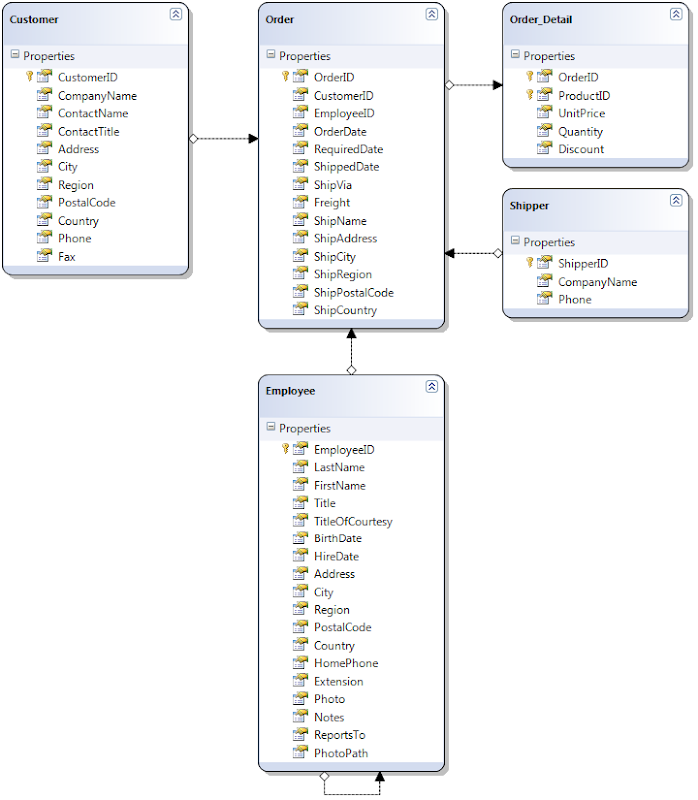
For this project the Northwind database will be used, you can download it from here (it says it is for SQL 2000 but works fine on SQL 2005 and SQL 2008 although if using SQL 2008 the database will be upgraded and then will not run on SQL 2000 or SQL 2005).

Figure 1 has some tables out of the Northwind database that have been added in to the Linq to SQL model.

Northwind DBML

Figure 1

Listing 1 is the metadata on some Northwind model.

[MetadataType(typeof(OrderMetadata))]
[TablePermissions(TablePermissionsAttribute.Permissions.DenyInserts, "Accounts")]
public partial class Order
{
}

public class OrderMetadata
{
    [FieldPermissions(FieldPermissionsAttribute.Permissions.DenyEdit, "Sales", "Production")]
    [FieldPermissions(FieldPermissionsAttribute.Permissions.DenyRead, "Accounts")]
    public Object OrderDate { get; set; }

    [FieldPermissions(FieldPermissionsAttribute.Permissions.DenyEdit, "Sales", "Production")]
    [FieldPermissions(FieldPermissionsAttribute.Permissions.DenyRead, "Accounts")]
    public Object RequiredDate { get; set; }

    // entities
    [HideInFilter]
    public Object Employee { get; set; }
}

[TablePermissions(TablePermissionsAttribute.Permissions.DenyRead, "Sales")]
public partial class Order_Detail
{
}

[TablePermissions(TablePermissionsAttribute.Permissions.DenyDelete, "Sales")]
[MetadataType(typeof(CustomerMetadata))]
public partial class Customer
{
}

public class CustomerMetadata
{
    [ScaffoldColumn(false)]
    public Object UpdatedBy { get; set; }
    [ScaffoldColumn(false)]
    public Object UpdatedOn { get; set; }
    [ScaffoldColumn(false)]
    public Object CreatedBy { get; set; }
    [ScaffoldColumn(false)]
    public Object CreatedOn { get; set; }

}

[TablePermissions(TablePermissionsAttribute.Permissions.DenyRead, "Sales")]
public partial class Employee
{
}

[TablePermissions(TablePermissionsAttribute.Permissions.DenyRead, "Sales")]
public partial class Shipper
{
}

Listing 1

Note: the table level metadata is on the partial class that is implemented from the DBML file this was to workaround a bug in DynamicData 5-12 release but it seems to be the correct place.

Next is the metadata helper classes...